Wednesday, 8 February 2017

Dynamics AX 2012 Workflow receives "Failed to find workflow" error

We have run across a few situations in Dynamics AX 2012 where the workflow batch job fails with the error "Failed to find workflow" message.  When the customer received this error it prevented the remaining workflow messages in the queue from being processed.  In order to process all of the items that were queued up we needed to complete the following steps:

1.  Identify the record(s) that are causing the batch to fail.
Select a.RECID from SYSWORKFLOWMESSAGETABLE a Where a.ROOTCORRELATIONID notin(Select b.ROOTCORRELATIONID fromSYSWORKFLOWTABLE b)and a.MESSAGELIFECYCLESTATE = 1
2.  Dequeue the SYSWORKFLOWMESSAGETABLE records that do not have a corresponding SYSWORKFLOWMESSAGETABLE record.
Update SYSWORKFLOWMESSAGETABLE Set MESSAGELIFECYCLESTATE = 2 where RECID =<RECID returned from statement above>
The procedures above will dequeue the message causing the error and allow the batch to complete.

Note:  As always, ensure you do a proper backup of your existing SYSWORKFLOWMESSAGETABLE prior to attempting this fix.

SysWorkflowMessageTable Table [AX 2012]

The SysWorkflowMessageTable table contains the workflow messages between Microsoft Dynamics AX and Microsoft Workflow Runtime. A message is connected to a workflow instance. The sender stores the message in the table and the receiver does the work requested by the message and removes the message. Messages are stored until the related workflow instance completes or is cancelled.

Methods

 MethodDescription
Gg938509.pubmethod(en-us,AX.60).gifaosValidateDeleteValidates on the server that the specified record can be deleted from a table. (Inherited from xRecord.)
Gg938509.pubmethod(en-us,AX.60).gifaosValidateInsertValidates on the server that the specified record can be inserted. (Inherited from xRecord.)
Gg938509.pubmethod(en-us,AX.60).gifaosValidateReadValidates on the server that the specified record can be read. (Inherited from xRecord.)
Gg938509.pubmethod(en-us,AX.60).gifaosValidateUpdateValidates on the server that the specified record can be updated. (Inherited from xRecord.)
Gg938509.pubmethod(en-us,AX.60).gifbuf2conPacks the table buffers of an xRecord instance into an X++ container. (Inherited from xRecord.)
Gg938509.pubmethod(en-us,AX.60).gifcancelTimeOutCancels a previous method call to the setTimeOut method. (Inherited from Object.)
Gg938509.pubmethod(en-us,AX.60).gifcanSubmitToWorkflowIndicates whether submission to workflow is possible. (Inherited from xRecord.)
Gg938509.pubmethod(en-us,AX.60).gifcaptionGets and sets the caption property of a table. (Inherited from xRecord.)
Gg938509.pubmethod(en-us,AX.60).gifcheckInvalidFieldAccessGets and sets invalid field access. (Inherited from xRecord.)
Gg938509.pubmethod(en-us,AX.60).gifcheckRecordGets and sets the property that indicates whether to check mandatory fields. (Inherited from xRecord.)
Gg938509.pubmethod(en-us,AX.60).gifcheckRestrictedDeleteActionsGets and sets the property that indicates whether a record can be deleted. (Inherited from xRecord.)
Gg938509.pubmethod(en-us,AX.60).gifclearRemoves all rows from the table buffer. (Inherited from xRecord.)
Gg938509.pubmethod(en-us,AX.60).gifcompanyGets and sets the property that indicates a legal entity for the record. (Inherited from xRecord.)
Gg938509.pubmethod(en-us,AX.60).gifcon2bufUnpacks a container into the table buffers. (Inherited from xRecord.)
Gg938509.pubmethod(en-us,AX.60).gifconcurrencyModelGets and sets the default concurrency model to use to update records. (Inherited from xRecord.)
Gg938509.pubmethod(en-us,AX.60).gifcontextGets and sets the context property. (Inherited from xRecord.)
Gg938509.pubmethod(en-us,AX.60).gifdataRetrieves a row from the table. (Inherited from xRecord.)
Gg938509.pubmethod(en-us,AX.60).gifdataSourceRetrieves the data source of the table. (Inherited from xRecord.)
Gg938509.pubmethod(en-us,AX.60).gifdefaultFieldPopulates default values in a field in the table. (Inherited from xRecord.)
Gg938509.pubmethod(en-us,AX.60).gifdefaultRowPopulates default values in fields in the table in the non-interactive case. (Inherited from xRecord.)
Gg938509.pubmethod(en-us,AX.60).gifdeleteDeletes the current record from the table. (Inherited from xRecord.)
Gg938509.pubmethod(en-us,AX.60).gifdisableCacheGets and sets the property that indicates whether caching is disabled. (Inherited from xRecord.)
Gg938509.pubmethod(en-us,AX.60).gifdisposeReleases resources that are used by the xRecord object. (Inherited from xRecord.)
Gg938509.pubmethod(en-us,AX.60).gifdoClearRemoves all rows from the table buffer and bypasses any additional logic in the clear method of the table. (Inherited from xRecord.)
Gg938509.pubmethod(en-us,AX.60).gifdoDeleteDeletes the current record from the table and bypasses any additional logic in the delete method of the table. (Inherited from xRecord.)
Gg938509.pubmethod(en-us,AX.60).gifdoInsertInserts the record into the table and bypasses any additional logic in the insert method of the table. (Inherited from xRecord.)
Gg938509.pubmethod(en-us,AX.60).gifdoUpdateUpdates the current record and bypasses any additional logic in the update method of the table. (Inherited from xRecord.)
Gg938509.pubmethod(en-us,AX.60).gifdoValidateDeletePerforms the action to validate that a record can be deleted. (Inherited from xRecord.)
Gg938509.pubmethod(en-us,AX.60).gifequalDetermines whether the specified object is equal to the current one. (Inherited from xRecord.)
Gg938509.pubmethod(en-us,AX.60).giffieldAccessRightReturns the field access right. (Inherited from xRecord.)
Gg938509.pubmethod(en-us,AX.60).giffieldBufferAccessRightReturns the field access right for the current record. (Inherited from xRecord.)
Gg938509.pubmethod(en-us,AX.60).giffieldStateSets or returns the state of a field in the table buffer. (Inherited from xRecord.)
Gg938509.pubmethod(en-us,AX.60).gifgetAllowRedefaultReturns the list of fields that are allowed to re-default. (Inherited from xRecord.)
Gg938509.pubmethod(en-us,AX.60).gifgetDefaultingDependenciesReturns the container that holds defaulting dependencies. (Inherited from xRecord.)
Gg938509.pubmethod(en-us,AX.60).gifgetExtensionReturns the table extension. (Inherited from xRecord.)
Gg938509.pubmethod(en-us,AX.60).gifgetFieldValueGets the value of the specified field from a table buffer. (Inherited from xRecord.)
Gg938509.pubmethod(en-us,AX.60).gifgetInstanceRelationTypeReturns the table name that corresponds to the InstanceRelationType ID. (Inherited from xRecord.)
Gg938509.pubmethod(en-us,AX.60).gifgetPhysicalTableNameReturn the physical table name, which, in the case of the SQL Temp DB table, is the table instance name. (Inherited from xRecord.)
Gg938509.pubmethod(en-us,AX.60).gifgetPresenceFieldDataRetrieves the PresenceInfo value from the specified field. (Inherited from xRecord.)
Gg938509.pubmethod(en-us,AX.60).gifgetSQLStatementGets the SQL statement that is used to return records from the database. (Inherited from xRecord.)
Gg938509.pubmethod(en-us,AX.60).gifgetTableInInstanceHierarchy(Inherited from xRecord.)
Gg938509.pubmethod(en-us,AX.60).gifgetTableTypeIndicates the type of the table. (Inherited from xRecord.)
Gg938509.pubmethod(en-us,AX.60).gifgetTimeOutTimerHandleReturns the timer handle for the object. (Inherited from Object.)
Gg938509.pubmethod(en-us,AX.60).gifhandleRetrieves the handle of the class of the object. (Inherited from Object.)
Gg938509.pubmethod(en-us,AX.60).gifhasRelatedTableIndicates whether a foreign key constraint buffer is linked with the table. (Inherited from xRecord.)
Gg938509.pubmethod(en-us,AX.60).gifhelpFieldRetrieves a string that contains the Help text for the specified field. (Inherited from xRecord.)
Gg938509.pubmethod(en-us,AX.60).gifinitValueInitializes a field to the default value. (Inherited from xRecord.)
Gg938509.pubmethod(en-us,AX.60).gifinputStatusSets or returns the current input status of the table buffer. (Inherited from xRecord.)
Gg938509.pubmethod(en-us,AX.60).gifinsertInserts the record into the table. (Inherited from xRecord.)
Gg938509.pubmethod(en-us,AX.60).gifinteractiveContextSets or returns the current interactive context of the table buffer. (Inherited from xRecord.)
Gg938509.pubmethod(en-us,AX.60).gifisFieldDataRetrievedChecks whether the data of the given field has been retrieved. (Inherited from xRecord.)
Gg938509.pubmethod(en-us,AX.60).gifisFieldSetChecks whether a field has a Set or Defaulted state. (Inherited from xRecord.)
Gg938509.pubmethod(en-us,AX.60).gifisFormDataSourceIndicates whether the data source is a form. (Inherited from xRecord.)
Gg938509.pubmethod(en-us,AX.60).gifisNewRecordReturns true if the record is a new record that hasn't been persisted yet. (Inherited from xRecord.)
Gg938509.pubmethod(en-us,AX.60).gifisPartOfUOWSaveChanges(Inherited from xRecord.)
Gg938509.pubmethod(en-us,AX.60).gifisTempDbIndicates whether the type of the table is SQL TempDB. (Inherited from xRecord.)
Gg938509.pubmethod(en-us,AX.60).gifisTmpIndicates whether this is a temporary table. (Inherited from xRecord.)
Gg938509.pubmethod(en-us,AX.60).gifjoinChildFinds the join child of the current record. (Inherited from xRecord.)
Gg938509.pubmethod(en-us,AX.60).gifjoinParentFinds the join parent of the current record. (Inherited from xRecord.)
Gg938509.pubmethod(en-us,AX.60).giflinkPhysicalTableInstanceChecks whether there is a link for the physical table instance for the record. (Inherited from xRecord.)
Gg938509.pubmethod(en-us,AX.60).gifmergeMerges the current table with the specified table. (Inherited from xRecord.)
Gg938509.pubmethod(en-us,AX.60).gifmodifiedFieldModifies the specified field to the original. (Inherited from xRecord.)
Gg938509.pubmethod(en-us,AX.60).gifmodifiedFieldValueModifies the specified field to the original value. (Inherited from xRecord.)
Gg938509.pubmethod(en-us,AX.60).gifnewInitializes a new instance of the Object class. (Inherited from Object.)
Gg938509.pubmethod(en-us,AX.60).gifnotifyReleases the hold on an object that has called the wait method on this object. (Inherited from Object.)
Gg938509.pubmethod(en-us,AX.60).gifnotifyAllReleases a lock on the object that was issued by the wait method on this object. (Inherited from Object.)
Gg938509.pubmethod(en-us,AX.60).gifobjectOnServerDetermines whether the object is on a server. (Inherited from Object.)
Gg938509.pubmethod(en-us,AX.60).giforigRetrieves the original values of the current record. (Inherited from xRecord.)
Gg938509.pubmethod(en-us,AX.60).gifoverwriteSystemfieldsGets and sets the property that indicates whether system fields can be overwritten. (Inherited from xRecord.)
Gg938509.pubmethod(en-us,AX.60).gifownerReturns the instance that owns the object. (Inherited from Object.)
Gg938509.pubmethod(en-us,AX.60).gifpostCacheLoadIs executed after data is hit from the cache for the select operation on the table. (Inherited from xRecord.)
Gg938509.pubmethod(en-us,AX.60).gifpostLoadIs executed after a record is read. (Inherited from xRecord.)
Gg938509.pubmethod(en-us,AX.60).gifpreRemotingIs executed before a cross-tier call is about to be executed for the table that would pack its state to the other tier. (Inherited from xRecord.)
Gg938509.pubmethod(en-us,AX.60).gifqueryTimedOutIndicates whether the query exceeded the time limit for execution. (Inherited from xRecord.)
Gg938509.pubmethod(en-us,AX.60).gifqueryTimeoutGets and sets the property that indicates the time limit for the execution of a query. (Inherited from xRecord.)
Gg938509.pubmethod(en-us,AX.60).gifreadCommittedLock(Inherited from xRecord.)
Gg938509.pubmethod(en-us,AX.60).gifreadPastGets and sets the property that indicates whether to skip rows that are locked by other processes when a record is read. (Inherited from xRecord.)
Gg938509.pubmethod(en-us,AX.60).gifrecordLevelSecurityGets and sets the property that indicates whether to apply security on a record level. (Inherited from xRecord.)
Gg938509.pubmethod(en-us,AX.60).gifrelatedTableSets or returns the related buffer of a link of a table buffer. (Inherited from xRecord.)
Gg938509.pubmethod(en-us,AX.60).gifrenamePrimaryKeyRenames the foreign keys in other tables according to the change of the corresponding primary key value in this table. (Inherited from xRecord.)
Gg938509.pubmethod(en-us,AX.60).gifrereadRereads the record from the table. (Inherited from xRecord.)
Gg938509.pubmethod(en-us,AX.60).gifRowCountRetrieves the number of rows in the table. (Inherited from xRecord.)
Gg938509.pubmethod(en-us,AX.60).gifselectForUpdateGets and sets the property that indicates whether to select records for update when they are read. (Inherited from xRecord.)
Gg938509.pubmethod(en-us,AX.60).gifselectLockedIndicates whether to select locked records. (Inherited from xRecord.)
Gg938509.pubmethod(en-us,AX.60).gifselectRefRecordSelects the record by referenced field ID. (Inherited from xRecord.)
Gg938509.pubmethod(en-us,AX.60).gifselectWithRepeatableReadGets and sets the property that indicates whether repeatable read is enabled. (Inherited from xRecord.)
Gg938509.pubmethod(en-us,AX.60).gifsetConnectionSets the user connection for this table. (Inherited from xRecord.)
Gg938509.pubmethod(en-us,AX.60).gifsetCrossPartitionSets or resets cross-partitioning for the table. (Inherited from xRecord.)
Gg938509.pubmethod(en-us,AX.60).gifsetFieldValueSets the field value in the record buffer. (Inherited from xRecord.)
Gg938509.pubmethod(en-us,AX.60).gifsetSQLTracingEnables or disables SQL tracing mode. (Inherited from xRecord.)
Gg938509.pubmethod(en-us,AX.60).gifsetTimeOutSets up the scheduled execution of a specified method. (Inherited from Object.)
Gg938509.pubmethod(en-us,AX.60).gifsetTmpSets the table so that it is not persisted to the database. (Inherited from xRecord.)
Gg938509.pubmethod(en-us,AX.60).gifsetTmpDataSets the contents of the temporary table to the specified data. (Inherited from xRecord.)
Gg938509.pubmethod(en-us,AX.60).gifsetXDSContextSets new XDS context. (Inherited from xRecord.)
Gg938509.pubmethod(en-us,AX.60).gifskipAosValidationGets and sets the property that indicates whether to skip validation of Microsoft Dynamics AX Application Object Server (AOS). (Inherited from xRecord.)
Gg938509.pubmethod(en-us,AX.60).gifskipDatabaseLogGets and sets the property that indicates whether to skip database log requests. (Inherited from xRecord.)
Gg938509.pubmethod(en-us,AX.60).gifskipDataMethodsGets and sets the property that indicates whether to discard overloaded methods. (Inherited from xRecord.)
Gg938509.pubmethod(en-us,AX.60).gifskipDeleteActionsGets and sets the property that indicates whether to skip delete actions on the table. (Inherited from xRecord.)
Gg938509.pubmethod(en-us,AX.60).gifskipDeleteMethodGets and sets the property that indicates whether to discard overloaded methods. (Inherited from xRecord.)
Gg938509.pubmethod(en-us,AX.60).gifskipEventsProvides an option to turn off calling the Application.event* methods for the lifetime of an xRecordobject. (Inherited from xRecord.)
Gg938509.pubmethod(en-us,AX.60).gifskipPostLoadGets and sets the property that indicates whether to skip executing the xRecord.postLoad method on the table. (Inherited from xRecord.)
Gg938509.pubmethod(en-us,AX.60).gifskipTTSCheckGets and sets the property that indicates whether to skip the check to determine whether the record is selected for update. (Inherited from xRecord.)
Gg938509.pubmethod(en-us,AX.60).gifsuppressWarningsGets and sets the property that indicates whether to suppress warnings for this pointer. (Inherited from xRecord.)
Gg938509.pubmethod(en-us,AX.60).giftableAccessRightReturns the table access right. (Inherited from xRecord.)
Gg938509.pubmethod(en-us,AX.60).giftableBufferAccessRightReturns the table access right for the current record. (Inherited from xRecord.)
Gg938509.pubmethod(en-us,AX.60).giftakeOwnershipOfTempDBTable(Inherited from xRecord.)
Gg938509.pubmethod(en-us,AX.60).giftoolTipFieldRetrieves the HelpText value for the specified field. (Inherited from xRecord.)
Gg938509.pubmethod(en-us,AX.60).giftoolTipRecordRetrieves the ToolTip value for the current record. (Inherited from xRecord.)
Gg938509.pubmethod(en-us,AX.60).giftoStringReturns a string that represents the current object. (Inherited from Object.)
Gg938509.pubmethod(en-us,AX.60).gifttsabortAborts a transaction that was started by a call to the ttsbegin method. (Inherited from xRecord.)
Gg938509.pubmethod(en-us,AX.60).gifttsbeginStarts a transaction that can be either committed by the ttscommit method or aborted by the ttsabort method. (Inherited from xRecord.)
Gg938509.pubmethod(en-us,AX.60).gifttscommitCommits a transaction that was started by a call to the ttsbegin method. (Inherited from xRecord.)
Gg938509.pubmethod(en-us,AX.60).gifupdateUpdates the current record. (Inherited from xRecord.)
Gg938509.pubmethod(en-us,AX.60).gifusageCountRetrieves the current number of references (the value of the reference counter) that the object has. (Inherited from xRecord.)
Gg938509.pubmethod(en-us,AX.60).gifuseExistingTempDBTable(Inherited from xRecord.)
Gg938509.pubmethod(en-us,AX.60).gifvalidateDeleteDetermines whether the current record is valid and ready to be deleted from the database. (Inherited from xRecord.)
Gg938509.pubmethod(en-us,AX.60).gifvalidateFieldDetermines whether the specified field is valid. (Inherited from xRecord.)
Gg938509.pubmethod(en-us,AX.60).gifvalidateFieldValue(Inherited from xRecord.)
Gg938509.pubmethod(en-us,AX.60).gifvalidateWriteDetermines whether the current record is valid and ready to be written. (Inherited from xRecord.)
Gg938509.pubmethod(en-us,AX.60).gifvalidTimeStateUpdateModeSets a valid time state update mode on the cursor. (Inherited from xRecord.)
Gg938509.pubmethod(en-us,AX.60).gifwaitPauses a process. (Inherited from Object.)
Gg938509.pubmethod(en-us,AX.60).gifwasCachedSpecifies the location from which the data was retrieved. (Inherited from xRecord.)
Gg938509.pubmethod(en-us,AX.60).gifwriteUpdates a record if it exists; otherwise, inserts a record. (Inherited from xRecord.)
Gg938509.pubmethod(en-us,AX.60).gifxmlRetrieves an XML string that represents the current object. (Inherited from xRecord.)
Gg938509.pubmethod(en-us,AX.60).gif Gg938509.static(en-us,AX.60).gif::existIndicates whether the specified record in the SysWorkflowMessageTable table exists.
Gg938509.pubmethod(en-us,AX.60).gif Gg938509.static(en-us,AX.60).gif::findByActivityFinds the specified record in the WorkflowMessageTable table.
Gg938509.pubmethod(en-us,AX.60).gif Gg938509.static(en-us,AX.60).gif::findByCorrelationFinds the specified record in the WorkflowMessageTable table.
Gg938509.pubmethod(en-us,AX.60).gif Gg938509.static(en-us,AX.60).gif::findByMessageId
Gg938509.pubmethod(en-us,AX.60).gif Gg938509.static(en-us,AX.60).gif::findQueuedFinds the specified record in the WorkflowMessageTable table.
Gg938509.pubmethod(en-us,AX.60).gif Gg938509.static(en-us,AX.60).gif::initFromWorkflowMessageMicrosoft internal use only.
Top

Fields

FieldTypeConfiguration keyDescription
ActionNameExtended Data Type:WorkflowOutcomeName
Type: String
NoneName of application object.
ActivityContextTypeEnumeration:WorkflowActivityContextTypeNoneThe workflow activity context type
ActivityInstanceIdExtended Data Type:WorkflowActivityInstanceId
Type: Guid
NoneActivity ID identifies a workflow activity. For example. a workflow task.
AssignedUserExtended Data Type:WorkflowAssignedUser
Type: String
NoneThe user assigned a return or request change work item.
AxaptaUserExtended Data Type:WorkflowUser
Type: String
NoneWorkflow User contains Microsoft Dynamics AX user name.
BatchAffinityExtended Data Type:WorkflowMessageBatchAffinity
Type: Guid
NoneThe batch affinity identifies the group of workflow messages being process instance of a workflow batch task.
BookmarkExtended Data Type:WorkflowBookmarkId
Type: Guid
NoneWorkflow runtime internal bookmark identifier
ConfigurationIdExtended Data Type:WorkflowConfigurationId
Type: Guid
NoneWorkflow ID identifies a workflow and its versions.
dEL_ModifiedTimeExtended Data Type:DEL_ModifiedTime
Type: Integer
None(This field applies only to the following version(s): Microsoft Dynamics AX 2012 R3, Microsoft Dynamics AX 2012 R2 (SYS))
MessageIdExtended Data Type:WorkflowMessageId
Type: Guid
NoneIdentifies a workflow message
MessageLifeCycleStateEnumeration:WorkflowMessageLifeCycleStateNoneMessage Life Cycle State identifies the life cycle state of workflow message.
MessageTypeEnumeration:WorkflowMessageTypeNoneMessage Type identifies the type of a workflow message (e.g. Activation, WorflowStarted etc.).
modifiedDateTimeExtended Data Type:ModifiedDateTime
Type: UtcDateTime
None
ParentCorrelationIdExtended Data Type:WorkflowParentCorrelationId
Type: Guid
NoneThe parent workflow correlation identity.
PartitionExtended Data Type: Partition
Type: Int64
None(This field applies only to the following version(s): Microsoft Dynamics AX 2012 R3, Microsoft Dynamics AX 2012 R2 (SYS))
RecIdExtended Data Type: RecId
Type: Int64
None
recVersionExtended Data Type:RecVersion
Type: Integer
None
RootCorrelationIdExtended Data Type:WorkflowRootCorrelationId
Type: Guid
NoneThe root workflow correlation identity.
SubWorkflowIdExtended Data Type:WorkflowSubWorkflowId
Type: Guid
NoneIdentification of the subworkflow
WorkflowContextCompanyIdExtended Data Type:CompanyId
Type: String
NoneCompany ID is the initials of the company accounts.
WorkflowContextRecIdExtended Data Type:WorkflowContextRecId
Type: Int64
NoneIdentifies the data record associated with the workflow.
WorkflowContextTableIdExtended Data Type:WorkflowContextTableId
Type: Integer
NoneIdentifies the data table containing the data record associated with the workflow.
WorkflowCorrelationIdExtended Data Type:WorkflowCorrelationId
Type: Guid
NoneCorrelation ID identifies a workflow instance.
WorkItemInstanceIdExtended Data Type:WorkflowWorkItemInstanceId
Type: Guid
NoneWorkItem ID identifies a work item.
Top

Relations

RelationTableLines
DataAreaDataArea
MessageIdSysWorkflowMessageTable
PartitionPartitions
UserInfoUserInfo
UserInfo1UserInfo
WorkflowVersionTableWorkflowVersionTable
WorkflowWorkItemTableWorkflowWorkItemTable
Top

Indexes


IndexAllowDuplicatesEnabledFields
ActivityIdxYesYes
BatchAffinityIdxYesYes
CorrelationIdxYesYes
MessageIdxNoYes
ParentCorrelationIdxYesYes
RecIdNoYes
RootCorrelationYesYes

How to insert attachments in the body of email message in Outlook?

Normally attachments are inserted at the message header above the body of an email message. However, sometimes you may receive some email messages with attachments inserted in the messages’ body, which makes the attachments much visible and not easy to ignore. And here we provide you with the guidance to insert attachments in the body of a composing email message in Microsoft Outlook.

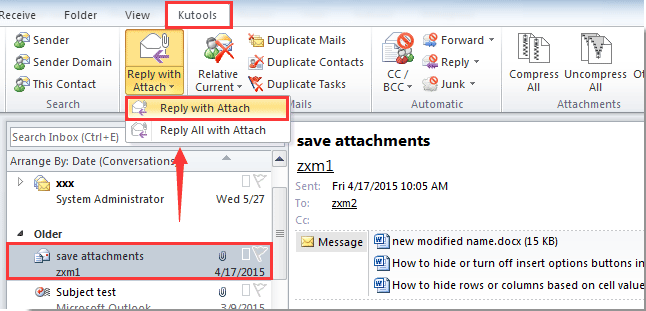
Reply with Attach (reply email with attachments)

doc reply with attachment 1
doc arrow dowm
doc reply with attachment 2
Kutools for Outlook20+ New Advanced Tools for Outlook.
Office TabEnable Tabbed Editing and Browsing in Office, Just Like Chrome, Firefox, IE 8/9/10.
Classic MenuBring Old Menus and Toolbars Back to Office 2007, 2010, 2013 and 2016.

arrow blue right bubbleInsert attachments in the message body directly

Kutools for OutlookIncludes 20+ powerful features and tools for Microsoft Outlook 2016, 2013, 2010 and Office 365.
First of all, we will show you how to insert attachments in the body of a composing e-mail message directly.
Step 1: Create a new email message:
  1. In Outlook 2010 / 2013, please click the New E-mail button in the New group on the Home tab.
  2. In Outlook 2007, please click the File > New > Mail Message.
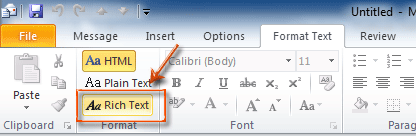
Step 2: Convert current email message into the Rich Text format.
  1. In Outlook 2010 / 2013, please click the Rich Text button in the Format group on the Format Text tab.
  2. In Outlook 2007, please click the Rich Text button in the Format group on the Options tab.
Step 3: Place the cursor at the position you will add attachments in the body of composing message.
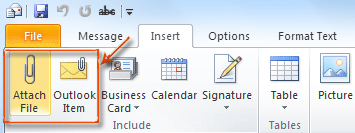
Step 3: Insert attachments with clicking the Attach File button or Outlook Items (or Attach Items) button on the Include group on the Insert tab.
And select the attached file in the popping up dialog box, and click OK or Insert button.
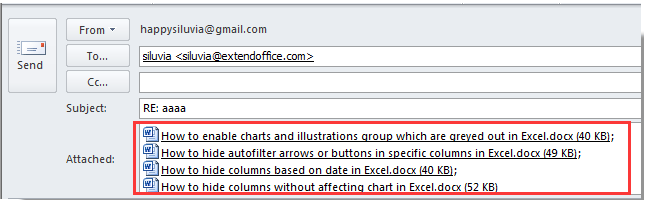
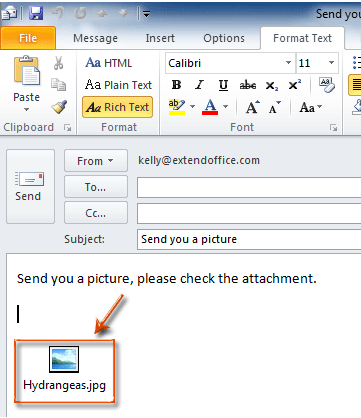
Then the attached files or Outlook items are inserted at the position where you put the cursor in Step 3. See the following screen shot:

arrow blue right bubbleMove attachments from the Message header to the message body

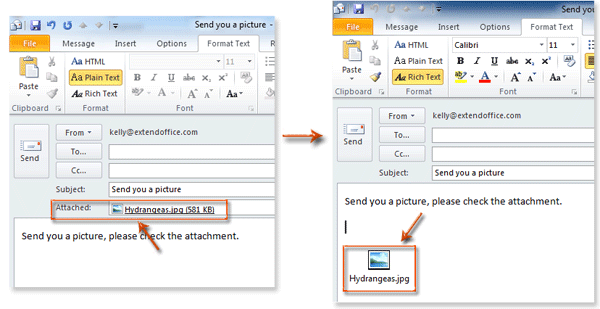
Sometimes you might have inserted attachments already, which showed in the Attached: box above the body of composing email message. In this condition, you can also change the message format, and make the attachments appear in the message body.
Just click the Rich Text button in the Format group on the Format Text tab in Outlook 2010 / 2013 (or Options tab in Outlook 2007), and then the attachments will be moved to the message body at once.

Thursday, 12 January 2017

How to setup fromDate and toDate range in SSRS AX2012

Setup date range in SSRS reports in AX 2012 

Private void getReportParameter()
{
    msPlanningScheduleContract contract = this.parmDataContract();

    isValid = true;

    if (contract)
    {
        salesStatus         = contract.parmSalesStatus();
        fromShippingDate    = contract.parmFromShippingDate();
        toShippingDate      = contract.parmToShippingDate();
        fromReceiptDate     = contract.parmFromReceiptDate();
        toReceiptDate       = contract.parmToReceiptDate();
        isValid             = contract.validate();
    }
}
================================================================

[ SysEntryPointAttribute() ]
Public void processReport()
{
    ProdTable       prodTable;
    SalesLine       salesLine;
    Query           query = this.parmQuery();
    QueryRun        queryRun;

    this. getReportParameter();

    if (fromShippingDate || toShippingDate)
    {
        query.dataSourceTable(tablenum(SalesLine)).addRange(fieldnum(salesLine, ShippingDateConfirmed)).value(queryRange(fromShippingDate, toShippingDate));
    }
    if (fromReceiptDate || toReceiptDate)
    {
        query.dataSourceTable(tablenum(SalesLine)).addRange(fieldnum(salesLine, ReceiptDateConfirmed)).value(queryRange(fromReceiptDate, toReceiptDate));
    }
    if (salesStatus)
        query.dataSourceTable(tableNum(SalesLine)).addRange(fieldNum(salesLine, SalesStatus)).value(SysQuery::value(enum2str(salesStatus)));

    queryRun = new QueryRun(query);
    while (queryRun.next())
    {
        salesLine   = queryRun.get(tableNum(SalesLine));
        prodTable   = queryRun.get(tableNum(ProdTable));

        this.insertmsPlanningScheduleTMP(salesLine, prodTable);
    }
}
================================================================

How to Set the Query Range on a SSRS Report

If the SSRS report is build with AOT query
SRSReportRun reportRun = new SRSReportRun(‘Report1.AutoDesign1’);
// Create variables for setting the range for the query.
Query query;
QueryBuildDataSource queryBuildDataSource;
QueryBuildRange queryBuildRange;
int i;
// Check if the query will return data.
if (reportRun.init())
{
// Find the Cust query.
query = reportRun.reportQuery(‘Cust’); // query name of the report
if (query != null)
{
// Get the Customers data source.
queryBuildDataSource = query.dataSourceName(‘Customers’);
if (queryBuildDataSource != null)
{
queryBuildRange = queryBuildDataSource.addRange(fieldName2Id(queryBuildDataSource.table(), ‘AccountNum’));
queryBuildRange.value(‘4000’);
}
}
// Save the report settings.
reportRun.saveSettings();
// Run the report.
reportRun.run();
}
If the report is build with Data contract
Here is an example which comes from the AOT – Classes – CustPamnManOutputReportController – preRunModifyContract method:
protected void preRunModifyContract()
{
Query reportQuery;
SrsReportRdlDataContract rdlContract;
rdlContract = this.parmReportContract().parmRdlContract(); // may be some changes require here if the report is 
running from some job.
if (rdlContract.getValue(#reportParameter))
{
custPaymManFile.reportDate(systemdateget());
custPaymManFile.status(PaymManRemittanceStatus::Sent);
}
this.processReport(custPaymManFile);
reportQuery = new Query(querystr(CustPaymManOutputReport));
SRSReportHelper::addParameterValueRangeToQuery(
reportQuery,
tablenum(TmpPaymManOutputReport),
fieldnum(TmpPaymManOutputReport, SessionId),
this.currentSessionId());
this.parmReportContract().parmQueryContracts().insert(queryKey, reportQuery);
}
===================================================================================

Query to get data less than date in ax 2009/ ax 2012

X++ Code to get the Ranges / Criteria from Query

 
Following Job illustrates how we can get the criteria / ranges specified by the user in the run-time Query 
criteria dialog.
static void Query_getRanges(Args _args)
{
    Query                   query = new Query();
    QueryRun                queryRun;
    QueryBuildDataSource    qbd;
    CustTable               custTable;
    QueryBuildRange         range;
    int                     cnt, i;
    ;

    qbd = query.addDataSource(tablenum(CustTable));

    queryRun = new QueryRun(query);

    queryRun.prompt();   // To Prompt the dialog

    cnt = queryRun.query().dataSourceTable(tablenum(CustTable)).rangeCount();
//custGroup = this.query().dataSourceTable(tablenum(CustInvoiceJour)).range(1).value();

    for (i=1 ; i<=cnt; i++)
    {
        range = queryRun.query().dataSourceTable(tablenum(CustTable)).range(i);
        info(strfmt("Range Field %1, Value %2",range.AOTname(),range.value()));
    }

    while (queryRun.next())
    {
        custTable = queryRun.get(tablenum(CustTable));
        info(strfmt("Customer %1, Name %2",custTable.AccountNum, custTable.Name));
    }
}
 

Query to get data less than date

 
private Query buildQuery(Query _query,StartDate _date)
{
    if(!tDate)
        tDate = systemDateGet();
    if(tDate)
    {
        _query.dataSourceTable(tablenum(DNemplContract)).addRange(fieldnum(DNemplContract, StartDate)). 
                                                                         value(strFmt("<= %1", tDate));
      //  _query.dataSourceTable(tablenum(DNemplContract)).addRange(fieldnum(DNemplContract, //StartDate)).
                                                                         value(queryValue(tDate));
 
    }
        return _query;
}
=========================================================================

Add Date range to query x++ ax 2012

query.dataSourceTable(tablenum(BudgetSourceTracking), 1).addRange(
fieldnum(BudgetSourceTracking, TrackingDate)).value
(queryRange(fiscalPeriodStartDate, fiscalPeriodEndDate));

==================================================================

AX2012 Date Ranges using Query Service

Before using this sample please refer this link that which I posted earlier.
http://krishhdax.blogspot.com/2012/02/ax2012-consume-query-service.html 

public void krishh_QueryServiceDateRangeFilter()
   {
      QueryServiceClient client = new QueryServiceClient();
      DataSet dataSet;
      Paging paging = new ValueBasedPaging() { RecordLimit = 1000 };
      QueryMetadata query;
      QueryDataSourceMetadata employeeDataSource;
      QueryDataRangeMetadata employeeRange;
      query = new QueryMetadata();
      // Set the properties of the query.
      query.QueryType = QueryType.Join;
      query.DataSources = new QueryDataSourceMetadata[1];
      // Set the properties of the EmployeeDataSource
      employeeDataSource = new QueryDataSourceMetadata();
      employeeDataSource.Name = "Employee";
      employeeDataSource.Enabled = true;
      employeeDataSource.Table = "HcmEmployment";
      //This property will set for Dataset to Retrieve all fields 
      employeeDataSource.DynamicFieldList = true;   
      // Add the data source to the query
      query.DataSources[0] = employeeDataSource;
      // filter for active employees only
      employeeRange = new QueryDataRangeMetadata();
      employeeRange.TableName = "HcmEmployment";
      employeeRange.FieldName = "ValidTo";
      employeeRange.Value = "31/12/2154 11:59 PM";
      employeeRange.Enabled = true;
      employeeDataSource.Ranges = new QueryDataRangeMetadata[1];
      employeeDataSource.Ranges[0] = employeeRange;
      // Exeucte the Query and load the data into the Dataset
      dataSet = client.ExecuteQuery(query, ref paging);
     // load your dataset to your grid or gridview.
    }


Happy DAXing.....

Friday, 30 December 2016

Create Worker-User relations in AX 2012 through X++ code

A relation between the worker and the system user records (System administration > Common > Users > User relations) is necessary to approve BOMs, enter timesheets or expense reports in Dynamics AX. The user records can be easily imported from the Active Directory, the Employee records can be migrated from a legacy ERP or a 3rd party system through the DIXF interface.
The DIXF in Dynamics AX CU9/CU10 can also fill the missing link between the two, but a simple idempotent X++ job can also be a viable solution to mass create missing DirPersonUser relations. The below script tries to match the users by the e-mail address, then by the First-Last name, then by the Last-First name etc.

// Align the users and the workers by the e-mail address first, and the name second
public static void generateDirPersonUser()
{
    DirPersonUser               dirPersonUser, dirPersonUser2;
    UserInfo                    userInfo;
    SysUserInfo                 sysUserInfo;
    HcmWorker                   hcmWorker;
    LogisticsElectronicAddress  electronicAddress;
    DirPerson                   dirPerson;
    Name                        rearrangedName;
    DirNameSequence             dirNameSequence;
    DirPersonName               dirPersonName;
    while select userInfo
        join sysUserInfo
            where sysUserInfo.Id == userInfo.id
        notexists join dirPersonUser2
            where dirPersonUser2.User == userInfo.id
    {
        dirPerson.clear();
        if (sysUserInfo.Email) // 1st attempt
        {
            select firstonly hcmWorker
                join dirPerson
                    where dirPerson.RecId == hcmWorker.Person
                join electronicAddress
                    where electronicAddress.Locator == sysUserInfo.Email
                       && electronicAddress.RecId == dirPerson.(DirPartyTable::electronicAddressType2primaryFieldId(LogisticsElectronicAddressMethodType::Email);
        }
        if (! dirPerson && strAlpha(userInfo.name))
        {
            dirPersonName.clear(); 
            [dirPersonName.FirstName,
             dirPersonName.MiddleName,
             dirPersonName.LastName] = str2con(strReplace(userInfo.name, '.,', ' '), ' ');
            while select dirNameSequence // 2nd, 3rd etc. attempt
            {    
                rearrangedName = dirPerson.name(dirPersonName,  DirNameSequence.DisplayAs);         
                select firstonly hcmWorker
                    join dirPerson
                        where dirPerson.RecId == hcmWorker.Person
                           && dirPerson.Name  == rearrangedName;
                if (dirPerson)
                    break;
            }
        }
        if (dirPerson && hcmWorker::getMaxEmploymentEndDate(hcmWorker.RecId) > DateTimeUtil::utcNow())
        {
            dirPersonUser.clear();
            dirPersonUser.initValue();
            dirPersonUser.PersonParty = dirPerson.RecId;
            dirPersonUser.User = userInfo.id;
            dirPersonUser.ValidFrom = hcmWorker::getMinEmploymentStartDate(hcmWorker.RecId);
            dirPersonUser.ValidTo = hcmWorker::getMaxEmploymentEndDate(hcmWorker.RecId);
            if (dirPersonUser.validateWrite())
            {
                dirPersonUser.insert();
            }
        }
    }
}

Happy DAXing...

Assign a date to DateTime in AX 2012

How to read/ initialize date to DateTime in AX 2012

I was working with a client where we were seeing an issue with a data import and the table HCMPositionWorkerAssignment's ValidFrom and ValidTo date fields were importing wrong for the worker's position in AX2012.

We wanted to set the ValidFrom to the date of 1/1/2017 (not derived from an AX function) and the ValidTo as the maximum date.  The maximum date seemed to be set to the valid of 'Never' but that was actually a max date of 12/31/2154.

There is often a 'developer' issue of remembering how to set dates not using an AX function.  Unless you do it all the time, its always a subject that takes a few minutes to remember how to do things with. Don't lie... You know its true...  If you're coming from AX 4.0, welcome to the UTC shock.

AX 4.0 always stored the data type 'Date' behind the scenes as a DateTime but just hacked off the time part on the AX end. There was a time EDT which was stored in seconds. Not too bad as long as you don't mind dividing by 60 all the time... There were some huge improvements in AX 2009 and 2012 wiht the UTCDateTime functionality. The biggest is the ability to see the date and time in AX as it is in SQL as well as be able to dynamically display timezone changes to the users based on where they are located.

Anyways.. There can be issues with the code needed to do paragraph two above. Here is how to do it:

HCMPositionWorkerAssignment.ValidFrom  = DateTimeUtil::newDateTime(1\1\2017, 0);HCMPositionWorkerAssignment.ValidTo    = DateTimeUtil::maxValue();

The maxValue() function will put the dateTime as the max date of 2154.  The newDateTime() function will allow you to set the field for what you specify if you use MM\DD\YYYY.  Make sure the slashes are '\' and not '/'.  It MUST be 1\1\2017 and not be 1/1/2017; note the back vs forward slashes.  There do not need to be single colon's around the variable.


For, In terms of worker it can be applied like this:

ValidFrom = hcmWorker::getMinEmploymentStartDate(hcmWorker.RecId);
ValidTo = hcmWorker::getMaxEmploymentEndDate(hcmWorker.RecId);

Happy DAXing...

Monday, 19 December 2016

Import / read date from excel to table.

Issue when import or read date type value from excel or csv file

Hi,
In excel or csv file let it be in string format itself. after that check your date format in system (AOS machine) whether it is MM/dd/yyyy or dd/MM/yyyy...

Example-1,

Suppose, your system date is in MM/dd/yyyy and you mapped Trans date in column 1 then:
 
Str                 dueDate;
dueDate                      = conpeek(con,1);
TableTMP.TransDate = str2date(dueDate,213);

Example-2,

Suppose, your system date is in dd/MM/yyyy and you mapped Trans date in column 1 then:
 
TableTMP.TransDate = str2date(conpeek(con,1),123);

Happy DAXing...

Tuesday, 13 December 2016

How to get today's +1 date in Dynamics AX X++?


info(date2StrXpp(today()+1)); // date of tomorrow

info(DateTimeUtil::toStr(DateTimeUtil::addDays(DateTimeUtil::utcNow(),-1))); // date of yesterday

info(date2StrXpp(systemDateGet()+1));

ValidFrom  <= DateTimeUtil::newDateTime(today(), 0, DateTimeUtil::getCompanyTimeZone())

HCMPositionWorkerAssignment.ValidFrom  = DateTimeUtil::newDateTime(1\1\2017, 0);HCMPositionWorkerAssignment.ValidTo    = DateTimeUtil::maxValue();

ValidFrom = hcmWorker::getMinEmploymentStartDate(hcmWorker.RecId);

ValidTo = hcmWorker::getMaxEmploymentEndDate(hcmWorker.RecId);


Monday, 12 December 2016

How to insert records in all companies through X++ code

How to insert records through crossCompany key word:

Test-1: 

static void Job2(Args _args)
{
    TableTMP    tableTMP; // we can take a temp table for testing
    DataArea    dataArea;
    
    ttsBegin;
    while select 
        crossCompany 
            id from dataArea
    {
        changeCompany(dataArea.id)
        {
            tableTMP = null;
            tableTMP.AccountNum = "Test03";
            tableTMP.Name       = "Test3 name";
            tableTMP.insert();
        }
    }
    ttsCommit;
}

Test-2: 

Let’s try to understand how CrossCompany and ChangeComany working with a simple job in AX 2012/2009.
1) CrossCompany:
CrossCompany keyword is access data from more than one or all the companies data which company specific.
Lets see the select statements with crosscompany’s use.
All Companies through Select Statement:
This job will access all vendor records from all the companies.
static void CrossCompanyDemo(Args _args)
{
VendTable vendTable;
;
While Select CrossCompany * from vendTable
{
info(Strfmt(“%1 : %2”, vendTable.AccountNum, vendTable.dataAreaId));
}
}
Few Companies(more than one and less than all) through Select Statement:
The below job will access the records of vendors of some specific companies.
static void CrossCompanySample(Args _args)
{
VendTable vendTable;
container con;
;
con = [ ‘TEST’, ‘AXT’, ‘DAX’];
While Select CrossCompany : Con * from vendTable
{
Info(Strfmt(“%1 : %2”, vendTable.AccountNum, vendTable.dataAreaId));
}
}
Now, it’s time for queries objects..
Through Dynamic Query:
Lets see the use of CrossCompany in Dynamic query through a job.
Static void CrossCompanysam(Args _args)
{
Query query;
QueryRun queryRun;
QueryBuildDataSource qbds;
QueryBuildRange qbr;
VendTable vendTable;
;
query = new Query();
qbds = query.addDataSource(TableNum(VendTable));
query.allowCrossCompany(True);
query.addCompanyRange(‘TEST’); // You can ignore the range statements if you want all the companies.
query.addCompanyRange(‘DAX’);
queryRun = new QueryRun(query);
while(queryRun.next())
{
vendTable = queryRun.getNo(1);
Info(Strfmt(“%1 : %2”, vendTable.AccountNum, vendTable.dataAreaId));
}
}
Through Static AOT Query:
You can understand how to use the crosscompany in Static AOT query with the below image.


To access all the companies, you need to set AllowCrossCompany property to YES.
ChangeComany:
Aim: To find out the number of customers in each company by using ChangeCompany keyword.
Static void crosscompanyjob(Args _args)
{
Dataarea    area;
Custtable   cust = null;
;
While select area
Where area.isVirtual == noyes::No // this filtration is needed to avoid virtual companies.
{
ChangeCompany(area.id)
{
cust = null; // It is mandatory to clear the cust buffer because if you won’t clear it, cust will refer to the old data (first select(below) execution) and takes the same for all the next selections.
Select count(recid) from cust;
{
info(strfmt(“%1 — %2”, area.Id, cust.RecId));
}
}
}
}

Test- 3: X++ Query object:

One way to create query in dynamics Ax is Query object. You can add by following way.
Query query;

QueryRun queryRun;

QueryBuildRange queryBuildRange;

QueryBuildDataSource queryBuildDataSource;

query = new Query();

queryBuildDataSource = query.addDataSource(TableNum(CustTable));

query.allowCrossCompany(true);

//Executes query built so far

queryRun = new QueryRun(query);

queryRun.allowCrossCompany(true);
This is most fastest way to get cross company data.

While select Query:

There two ways for Get cross Company query and or Query inside the change company statement.
Cross company Keyword:
Add cross company query inside the while select statement to extract data all legal entities in Dynamics AX as  follow code.
Custtable _CustTable;

While select crosscompany * from _Custtable

{

Info (_Custtable.AccountNum + “   :  “ + int642str(_Custtable.DataAreaId);

}
If you want to restrict the query to fetch data from limited legal Entities you have to use a container as follow.
Container _ListOfLegalEntites ={ ‘mazang’,’Jubergi’,’Urdu Bazar’};

While select  crosscompany:_ListOfLegalEntites * from _Cust

{

Info(_Custtable.AccountNum + “  :  “ + _Custtable.DataAreaId);

}
Change Company Keyword:
One method is to use change company keyword. It is most time consuming method. To reduce its time, we have rest the table to null when Change Company happened. In Dynamics All legal entities name stored at  DataArea table we use this table to get the list of datarea and used inside the changeCompany  query on it as follow.
DataArea _DataArea;

Custtable _Custtable;

While select Id from _DataArea

changeCompany(_DataArea.Id)

{

_Custtable= null;

While select * from _Custtable

{

Info(_Custtable.AccountNum +”  :   “ + _Custtable.AreaId);

}

}

If you did not reset the table buffer , result will be too heavy, reason buffer contains old data as well. To reset or set null inside the change company statement and before query on buffer will be performance bust as well as design pattern.

Test-4: 

You can create a cross-company query by using the crossCompany keyword on the X++ select statement. You have the option of adding a container variable of company identifiers immediately after the crossCompany keyword (separated by a colon). The container restricts the selected rows to those with a dataAreaId that match a value in the container.
The following code example populates a table buffer with all the BankAccountTable rows that have a dataAreaId of either cm1 or cm2 or dat. This example assumes that the user has authority to access data for these three companies. The first two dataAreaId values that are found will be printed.
static void JobDemoCrossCompany(Args _args)
{
    BankAccountTable tabBAT; // saveDataPerCompany == true.
    container conCompanies = [ 'cm1', 'cm2', 'dat' ];
    str 4 sCompanyPrevious = " "; // Maximum length is 4 characters.
    int iCountCompanies = 0;
    ;
    while select
        crossCompany
            : conCompanies
        * from tabBAT
        order by dataAreaId
    {
        if ( sCompanyPrevious != tabBAT.dataAreaId )
        {
            info( tabBAT.dataAreaId + " = tabBAT.dataAreaId" );
            iCountCompanies++;
            if ( iCountCompanies >= 2 )
            {
                break;
            }
            sCompanyPrevious = tabBAT.dataAreaId;
        }
    }
    return;
}

In X++ code you can use the Query .allowCrossCompany property method to achieve the same result as you can with the crossCompanykeyword on a select statement. The calls to the Query .addCompanyRange method are the same as appending a container of companies to the crossCompany keyword.
You cannot perform data source level filtering by company in a cross-company query. This is why the call to qbds3 .company is commented out in the following code example.
static void JobDemoAllowCrossCompany(Args _args)
{
    BankAccountTable tabBAT; // saveDataPerCompany == true.
    Query qry2;
    QueryBuildDataSource qbds3;
    QueryRun qrun4;
    str sCompanyPrevious = "   ";
    int iCountCompanies = 0;
    int iTableNumBAT;
    ;
    qry2 = new Query();
    qry2.allowCrossCompany( true );
    qry2.addCompanyRange( 'dat' );
    qry2.addCompanyRange( 'twf' );
    
    iTableNumBAT = tableNum( BankAccountTable );
    qbds3 = qry2 .addDataSource( iTableNumBAT );
    //qbds3.company( 'dat' );
    
    qrun4 = new QueryRun( qry2 );
    
    while ( qrun4.next() )
    {
        if ( qrun4.changed( iTableNumBAT ) )
        {
            tabBAT = qrun4.get( iTableNumBAT );
    
            if ( sCompanyPrevious != tabBAT.dataAreaId )
            {
                print( tabBAT.dataAreaId + " = tabBAT.dataAreaId" );
                iCountCompanies++;
                if ( iCountCompanies >= 2 )
                {
                    break;
                }
                sCompanyPrevious = tabBAT.dataAreaId;
            }
        }
    }
    pause;
    return;
}

Happy DAXing......