Wednesday, 15 July 2020

Using Expressions in Query Ranges in Dynamics 365 FinOps

Using Expressions in Query Ranges in D365 FO

Query range value expressions can be used in any query where you need to express a range that is more complex than is possible with the usual dot-dot notation (such as 5012..5500).
For example, to create a query that selects the records from the table MyTable where field A equals x or field B equals y, do the following.
  1. Add a range on field A.
  2. Set the value of that range to the expression (if x = 10 or y = 20), as a string: ((A == 10) || (B == 20))
The rules for creating query range value expressions are:
  • Enclose the whole expression in parentheses.
  • Enclose all subexpressions in parentheses.
  • Use the relational and logical operators available in X++.
  • Only use field names from the range's data source.
  • Use the dataSource.field notation for fields from other data sources in the query.
Values must be constants in the expression, so any function or outside variable must be calculated before the expression is evaluated by the query. This is typically done by using the strFmt function.
The example above will then look like the following code example.
strFmt('((A == %1) || (B == %2))',x,y)
To get complete compile-time stability, use intrinsic functions to return the correct field names, as shown in the following code example.
strFmt('((%1 == %2) || (%3 == %4))',
fieldStr(MyTable,A), x,
fieldStr(MyTable,B), y)

 Note: Query range value expressions are evaluated only at run time, so there is no compile-time checking. If the expression cannot be understood, a modal box will appear at run time that states "Unable to parse the value."

Example of adding a range to a query

The following code programmatically adds a range to a query and uses string substitution to specify the data source and field name. The range expression is associated with the CustTable.AccountNum field; however, because the expression specifies the data sources and field names, the expression can be associated with any field in the CustTable table.

static void AddRangeToQuery3Job(Args _args)
    {
        Query q = new Query();  // Create a new query.
        QueryRun qr;
        CustTable ct;
        QueryBuildDataSource qbr1;
        str strTemp;
        ;
    
        // Add a single datasource.
        qbr1 = q.addDataSource(tablenum(CustTable));
        // Name the datasource 'Customer'.
        qbr1.name("Customer");
    
        // Create a range value that designates an "OR" query like:
        // customer.AccountNum == "4000" || Customer.CreditMax > 2500.
    
        // Add the range to the query data source.
        qbr1.addRange(fieldNum(CustTable, AccountNum)).value(
        strFmt('((%1.%2 == "4000") || (%1.%3 > 2500))',
            qbr1.name(),
            fieldStr(CustTable, AccountNum),
            fieldStr(CustTable, CreditMax)));
    
        // Print the data source.
        print qbr1.toString();
        info(qbr1.toString());
    
        // Run the query and print the results.
        qr = new QueryRun(q);
    
        while (qr.next())
        {
            if (qr.changedNo(1))
            {
                ct = qr.getNo(1);
                strTemp = strFmt("%1 , %2", ct.AccountNum, ct.CreditMax);
                print strTemp;
                info(strTemp);
            }
        }
        pause;
    }

Another Example of adding a range to a query

The following code programmatically adds a range to a query and uses string substitution to specify the data source and field name. The range expression is associated with the HSSalesTableStaging.RecID field which is linked with HSSalesOrderChargesStaging.RefRecID; however, because the expression specifies the data sources and field names, the expression can be associated with any field in the HSSalesTableStaging table.

[DataSource]
    class HSSalesTableCharges
    {
        /// <summary>
        ///
        /// </summary>
        public void executeQuery()
        {
            Query                   query = new Query();
            QueryBuildDataSource    qbd1, qbd2;

            qbd1 = query.addDataSource(tableNum(HSSalesTableStaging));
            qbd1.name("HSSalesTableStagingHeader");

            qbd2 = qbd1.addDataSource(tableNum(HSSalesOrderChargesStaging));
            qbd2.joinMode(JoinMode::InnerJoin);
            qbd2.name("HSSalesTableCharges");
            qbd2.addRange(fieldNum(HSSalesTableStaging, RecId)).value(strFmt('%1.%2 == %3.%4',qbd1.name(), fieldStr(HSSalesTableStaging, RecId), qbd2.name(), fieldStr(HSSalesOrderChargesStaging, RefRecId)));
            
            super(); 
        }
    }


Happy DAXing...


Monday, 13 July 2020

Create address at run time in Dynamics 365 FinOps

DAX Folks,

Here is a quick code to create the delivery address at runtime. You can use this while creating new Purchase requisition, Purchase order, Sales order or a person.

Today, we are going to create One-Time address and Delivery address for a particular process. Lets choose a process of sales order  and the requirement is- to create one time address or delivery address based on a flag.

Have a look on below code,
  • Create One-time address at run time in D365 FO
So we are going to use LogisticsPostalAddressEntity to get the right address with a new one or an existing one. This code should also handle if there is any update in any existing record by updating effective date stamp.

Here, xxxSalesTableStaging is the staging table which should have all the necessary address component's data like Country region, Zip code, State, City, Street and etc... 

private LogisticsPostalAddressRecId createOneTimePostalAddress(xxxSalesTableStaging _stagingTable)
    {
        LogisticsAddressing                             addressing;
        LogisticsPostalAddress                          logisticsPostalAddress;
        LogisticsPostalAddressView                      postalAddressView, newPostalAddressView;
        LogisticsPostalAddressEntity                    postalAddressEntity;
        DirPartyPostalAddressView                       newPartyAddressView;
        LogisticsPostalAddressRecId                     postalAddressRecId;
        LogisticsPostalAddressStringBuilderParameters   addressStringBuilderParameters = new LogisticsPostalAddressStringBuilderParameters();
                 
        addressStringBuilderParameters.parmCountryRegionId(_stagingTable.CountryRegionId);
        addressStringBuilderParameters.parmZipCodeId(_stagingTable.ZipCode);
        addressStringBuilderParameters.parmStateId(_stagingTable.State);
        addressStringBuilderParameters.parmCityName(_stagingTable.City);
        addressStringBuilderParameters.parmStreet(_stagingTable.Street);
             
        addressing = LogisticsPostalAddressStringBuilder::buildAddressStringFromParameters(addressStringBuilderParameters);

        select firstonly postalAddressView
            where postalAddressView.Address  == addressing;

        if (postalAddressView)
        {
            postalAddressRecId = postalAddressView.PostalAddress;
        }
        else
        {
            logisticsPostalAddress.CountryRegionId  = _stagingTable.CountryRegionId;
            logisticsPostalAddress.ZipCode          = _stagingTable.ZipCode;
            logisticsPostalAddress.State            = _stagingTable.State;
            logisticsPostalAddress.City             = _stagingTable.City;
            logisticsPostalAddress.Street           = _stagingTable.Street;

            newPartyAddressView.initFromPostalAddress(logisticsPostalAddress);
            newPartyAddressView.LocationName = _stagingTable.DeliveryName ? _stagingTable.DeliveryName : custTable.name();

            postalAddressEntity = LogisticsPostalAddressEntity::construct();

            newPostalAddressView.initFromPartyPostalAddressView(newPartyAddressView);
            logisticsPostalAddress = postalAddressEntity.createPostalAddress(newPostalAddressView);

            postalAddressRecId = logisticsPostalAddress.RecId;
        }

        return postalAddressRecId;
    }

  • Create Delivery address at run time in D365 FO

 So we are going to use DirParty and LogisticsLocationRole to get the party and role type. LogisticsPostalAddressEntity will also be used to get the right address with a new one or an existing one. This code should also handle if there is any update in any existing record by updating effective date stamp.

Here, i am getting custTable from global variable (you can take any customer account for your testing) and xxxSalesTableStaging is the staging table which should have all the necessary address component's data like Country region, Zip code, State, City, Street and etc...

private LogisticsPostalAddressRecId createDeliveryPostalAddress(HSSalesTableStaging _stagingTable)
    {
        DirParty                                        dirParty;
        container                                       roleIds;
        LogisticsAddressing                             addressing;
        LogisticsPostalAddress                          postalAddress;
        DirPartyPostalAddressView                       partyAddressView, newPartyAddressView;
        LogisticsPostalAddressRecId                     postalAddressRecId;
        LogisticsPostalAddressStringBuilderParameters   addressStringBuilderParameters = new LogisticsPostalAddressStringBuilderParameters();

        addressStringBuilderParameters.parmCountryRegionId(_stagingTable.CountryRegionId);
        addressStringBuilderParameters.parmZipCodeId(_stagingTable.ZipCode);
        addressStringBuilderParameters.parmStateId(_stagingTable.State);
        addressStringBuilderParameters.parmCityName(_stagingTable.City);
        addressStringBuilderParameters.parmStreet(_stagingTable.Street);
             
        addressing = LogisticsPostalAddressStringBuilder::buildAddressStringFromParameters(addressStringBuilderParameters);

        select firstonly partyAddressView
            where partyAddressView.Party == custTable.Party
            &&    partyAddressView.Address == addressing;

        if (partyAddressView)
        {
            postalAddressRecId = partyAddressView.PostalAddress;
        }
        else
        {
            postalAddress.clear();
            //postalAddress.initValue();
            postalAddress.Street           = _stagingTable.Street;
            postalAddress.City             = _stagingTable.City;
            postalAddress.State            = _stagingTable.State;
            postalAddress.ZipCode          = _stagingTable.ZipCode;
            postalAddress.CountryRegionId  = _stagingTable.CountryRegionId;

            newPartyAddressView.initFromPostalAddress(postalAddress);
            newPartyAddressView.Party = custTable.Party;
            newPartyAddressView.LocationName = _stagingTable.DeliveryName ? _stagingTable.DeliveryName : custTable.name();

            dirParty = DirParty::constructFromPartyRecId(CustTable.Party);                  
            roleIds = [LogisticsLocationRole::findBytype(LogisticsLocationRoleType::Delivery).RecId];

            newPartyAddressView = dirParty.createOrUpdatePostalAddress(newPartyAddressView, roleIds);
            postalAddressRecId = newPartyAddressView.PostalAddress;                                            
        }

        return postalAddressRecId;
    }


Go for a drive and revert with your question if any.

Happy DAXING...


Sunday, 13 October 2019

Use RecordInsertList in D365

Simple way to insert record list

Just for an example, we need to insert records in a regular table but for temporary purpose.

void method()
{
InventTable inventTable;
        InventDimCombination    inventDimCombination;
SMCItemPriceTmp itemPriceTmpTable;
RecordInsertList    itemPriceTmpTableList = new RecordInsertList(tableNum(SMCItemPriceTmp), false, false, false, false, false, itemPriceTmpTable);

ttsbegin;
        itemPriceTmpTable.selectForUpdate(true);
        delete_from itemPriceTmpTable;
        ttscommit;

while select inventDimCombination
            where inventDimCombination.ItemId == inventTable.ItemId
        {
            itemPriceTmpTable.RetailVariantId = inventDimCombination.RetailVariantId;
 
    ecoResProductMasterDimValueTranslation.clear();
            ecoResProductMasterColor.clear();
            ecoResProductMaster.clear();
            ecoResColor.clear();
            inventDim.clear();

            select firstonly Description from ecoResProductMasterDimValueTranslation
            exists join ecoResProductMasterColor
                where ecoResProductMasterColor.RecId == ecoResProductMasterDimValueTranslation.ProductMasterDimensionValue
            exists join ecoResProductMaster
                where ecoResProductMaster.RecId == ecoResProductMasterColor.ColorProductMaster
                &&    ecoResProductMaster.RecId == ecoResProduct.RecId
            exists join ecoResColor
                where ecoResColor.RecId == ecoResProductMasterColor.Color
            exists join inventDim
                where inventDim.InventColorId == ecoResColor.Name
                &&    inventDim.inventDimId == inventDimCombination.InventDimId;

            itemPriceTmpTable.Description = ecoResProductMasterDimValueTranslation.Description;

            itemPriceTmpTableList.add(itemPriceTmpTable);
        }

        ttsbegin;
        itemPriceTmpTableList.insertDatabase();
        ttscommit;
}

Happy DAXing...

Wednesday, 20 March 2019

Data Query ranges and query filter in AX

Scenario#01:

static void GetRangeValueOfQuery(Args _args)
{
Query query = new Query();
QueryRun queryRun;
QueryBuildDataSource qbd;
Bill_Table vendTable;
QueryBuildRange range;
int ct, i;

qbd = query.addDataSource(tablenum(Bill_Table));
queryRun = new QueryRun(query);
queryRun.prompt(); // To Prompt the dialog
ct = queryRun.query().dataSourceTable(tablenum(Bill_Table)).rangeCount();
for (i=1 ; i<=ct; i++)
{
range = queryRun.query().dataSourceTable(tablenum(Bill_Table)).range(i);
info(strfmt(“Range Field – %1, Value – %2”,range.AOTname(),range.value()));
}
range = qbd.addRange(fieldnum(Bill_Table,ItemName));
while (queryRun.next())
{
vendTable = queryRun.get(tablenum(Bill_Table));
info(strfmt(“Item – %1, Name – %2”,vendTable.ItemName, vendTable.CustName));
}
}

Scenario#02:

static void Johnkrish_GetRangeValueOfQuery(Args _args)
{
Query query;
QueryRun queryRun;
QueryBuildDataSource qbd;
GeneralJournalAccountEntry vendTable;
QueryBuildRange range;
QueryFilter qf;
GeneralJournalAccountEntry generalJournalAccountEntry;
int cnt, i;

query = new query();
qbd = query.addDataSource(tablenum(GeneralJournalAccountEntry));
queryRun = new QueryRun(query);
queryRun.prompt();
query = queryRun.query();
cnt=query.queryFilterCount();
for (i = 1; i <=cnt ; i++)
{
qf = query.queryFilter(i);
info(strFmt(“Range Field – %1: Value – %2”, qf.field(), qf.value()));
}
while (queryRun.next())
{
generalJournalAccountEntry = queryRun.get(tablenum(GeneralJournalAccountEntry));
info(strfmt(“PostingType – %1, LederAccount – %2”,generalJournalAccountEntry.PostingType, generalJournalAccountEntry.LedgerAccount));
}
}

Scenario#03:

Use the following code in the init method of datasource Test to get the latest data for every record(used groupby on customer)
public void init()
{
   QueryBuildDataSource qbds;
   super();
   qbds = this.query().dataSourceTable(tableNum(Test));
   qbds.addSelectionField(fieldNum(Test, CustAccount));
   qbds.addSelectionField(fieldNum(Test, Date), SelectionField::Max);
   qbds.addGroupByField(fieldnum(Test, CustAccount));
   qbds.orderMode(OrderMode::GroupBy);
}

Scenario#04:

public void executeQuery()
{
    this.queryBuildDataSource().validTimeStateAsOfDate(_dateValue);
    super();
}

If you have an interval, use this instead:

this.queryBuildDataSource().validTimeStateDateRange(fromDate, toDate)

Scenario#05:

public void lookup()
{
    Query query = new Query();
    QueryBuildDataSource queryBuildDataSource;
    QueryBuildRange queryBuildRange;
     QueryBuildRange queryBuildRange2;
     QueryBuildRange queryBuildRange3;

    SysTableLookup sysTableLookup = SysTableLookup::newParameters(tableNum(SalesTable), this);

    if(DateFrom.dateValue() && DateTo.dateValue())
    {
        sysTableLookup.addLookupfield(fieldNum(SalesTable, CustAccount));

        queryBuildDataSource = query.addDataSource(tableNum(SalesTable));

        queryBuildDataSource.addGroupByField(fieldNum(SalesTable, CustAccount));

        queryBuildRange = queryBuildDataSource.addRange(fieldNum(SalesTable, createdDateTime));
        queryBuildRange.value(SysQuery::range(this.dboConvertDateToDateTime(DateFrom.DateValue()), dateNull()));

        queryBuildRange = queryBuildDataSource.addRange(fieldNum(SalesTable, createdDateTime));
        queryBuildRange.value(SysQuery::range(dateNull(), this.dboConvertDateToDateTime(DateTo.dateValue())));

        queryBuildRange = queryBuildDataSource.addRange(fieldNum(SalesTable, InventSiteId));
        queryBuildRange.value(editInventSiteId.text());

        sysTableLookup.parmQuery(query);

        sysTableLookup.performFormLookup();

    }
    //super();

Tuesday, 17 October 2017

How to get DateNull in axapta X++

Hi,
DateNull for the date can be checked by two ways
1.Global::DateNull()
2.or like this
 if (endDate != mkdate(1,1,1900)

The minimum value for the date in x++ is 1/1/1900 and max value is 12/31/2154

If you have utcDateTime here is how you can set dateNull and maximum value

todayDate = DateTimeUtil::minValue();
maximumDate =  DateTimeUtil::maxValue();
blankUtcDate = utcDateTimeNull();

Friday, 29 September 2017

Microsoft Dynamics AX 2012 Security Policies Extensible Data Security (XDS)- Create Security Policy


Setup AOT Query range with CreatedBy as curren


SysQueryRangeUtil::currentUserId Method [AX 2012]

e.g. Using Methods in Table Filters & Query Ranges in Dynamics AX 2012


In Dynamics AX, there is a class called SysQueryRangeUtil that can be utilized in both query ranges and table filters. Using methods from this class allow you to be very precise about what dates you want to use in reports or for filtering your data.
Let’s say you have a report that you always want to run to see orders with shipping dates of the next day. It is possible to do so by using one of the methods from the SysQueryRangeUtil. The use of the letter ‘t’ will work for today’s date, but when you try to add days to it, it doesn’t work in reports. Instead, I will use the currentdate() method and add 1 to it.
Note: All methods & expressions must be surrounded by parentheses as shown below.
Figure 1 – Filtering the requested ship dates in an AX query for tomorrow (current day + 1)
On any form with a grid, you filter your data by pressing Ctrl+G. If I were to want to see open customer invoices from the last 90 days, I would filter my open customer invoices form and use the method (dayRange(-90,0)). The first number represents how many months backward from this month, and the second represents how many months forward. The same sorts of things can be done for the monthRange()yearRange(), and dateRange() methods. The best part about this is that you can of course save these filters to create views that you might use on a daily basis.
Figure 2 – Searching the grid for the past 90 days
If you are creating your query ranges in code, these methods can also be utilized whenever you are setting them. Definitely be sure to check out the SysQueryRangeUtil class as there are many more methods to use.

Here are some of them:
currentCustomerAccount()
currentVendorAccount()
currentUserId()
currentDate()
dateRange()
day()
dayRange()
greaterThanDate()
greaterThanUtcDate()
greaterThanUtcNow()
lessthanDate()
lessthanUtcDate()
lessthanUtcNow()
monthRange()
yearRange()

e.g. Custom Query Range Functions using SysQueryRangeUtil

You've probably seen these requests before. Users want to submit some report or other functionality to batch, and the query should always be run for "yesterday". It's a typical example where, as a user, it would be handy to be able to use functions in your query range. Well, you can. And in fact, you can make your own, very easily!

Enter the class "SysQueryRangeUtil". All it contains is a bunch of static public methods that return query range values. For example, there is a method called "day" which accepts an optional integer called "relative days". So, in our example of needing a range value of "tomorrow", regardless of when the query is executed, you could use day(-1) as a function. How this works in a range? Just open the advanced query window and enter your function call within parentheses.

Let's make our own method as an example. Add a new method to the SysQueryRangeUtil class, and enter the following, most interesting code you've ever encountered.


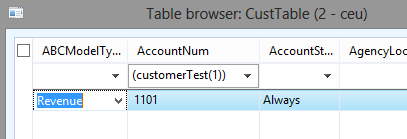
public static str customerTest(int _choice = 1)
{
    AccountNum accountNum;
    
    switch(_choice)
    {
        case 1:
            accountNum = '1101';
            break;
        case 2:
            accountNum = '1102';
            break;
    }
    
    return accountNum;
}


So, this accepts an options parameter for choice. If choice is one (or choice is not specified), the function returns 1101, if 2 it returns 1102. Save this method and open a table browser window on the CustTable table. Type CTRL+G to open the grid filters. In the filter field for the AccountNum field, enter: (customerTest(1)).


So, the string returned from the method is directly put in the range. So, you could do all sort of interesting things with this, of course. Check out some of the methods in the SysQueryRangeUtil as examples.


Happy DAXing...

Friday, 7 July 2017

String validation: let say (for Universal Id)


  • First letter should be 'R' and in UPPERCASE only.
  • string length should be upto 9-char
  • String value should start with uppercase 'R' and followed by eight numbers.
  • rest eight numbers varies in 0-9 only.


public boolean validate()
{
    boolean     ret;
    int         i = 1;
    anytype     isValid;
    str         universalId = CustTable_HSI_UniversalId.valueStr(); //let say "R012345678"
    TextBuffer  txt = new TextBuffer();

    //ret = super();

    if (char2num(universalId, i) == char2num(strUpr(universalId), i))
    {
        ret = true;
    }
    else
    {
        ret = false;
        throw Global::error("Universal Id should start with uppercase R character.");
    }

    isValid = strlen(universalId);
    if (isValid == 9)
    {
        ret = true;
    }
    else
    {
        ret = false;
        throw Global::error("Universal Id should be upto 9-character.");
        }
    isValid = strFind(universalId,'R',1,1);
    if (isValid == 1)
    {
        ret = true;
    }
    else
    {
        ret = false;
        throw Global::error("Universal ID should start with uppercase R followed by eight numbers.");
    }
    universalId = substr(universalId, 2,9);
    txt.setText(universalId);
    txt.regularExpressions(true);   // activate regular expr in search

    // Regular expression to validate only digits
    if (txt.find("^[0-9]+$"))
    {
        ret = true;
    }
    else
    {
        ret = false;
        throw Global::error("Universal ID should start with uppercase R followed by eight numbers.");
    }
    ret = super();
    return ret;
}

Happy DAXing...

String to Validate in case letter (Uppercase/ Lowercase) [Regular Expression is AX ]

I would like to share a logic puzzle that baffled me today. This may likely work in many programming languages, but obviously I am going to show you X++ code.

Problem:
Given the following string, write a job that displays a list of all the characters that are uppercase: AbDtw%@32E

Job-1:

static void findCapitalLetters(Args _args)
{
    str testStr = "R12345678";
    int i = 1;
    str character;

    character = subStr(testStr, i, 1);

    //If the character is EQUAL to it's uppercase counterpart, it must be uppercase:
    if (char2num(testStr, i) == char2num(strUpr(testStr), i))
    {
        info(strFmt("'%1' at position %2 is an uppercase letter.", character, i));
    }
}

I assumed that you would write a loop that compared each character with it’s uppercase character and if the character is equal to it’s uppercase counterpart, the character must be uppercase. Let’s try that:

Job-2:

static void findCapitalLetters(Args _args)
{
    str testStr = "AbDtw%@32E";
    int i ;
    int stringLenght = strLen(testStr);
    str character;

    for (i = 1; i <= stringLenght; i += 1)

    {
        character = subStr(testStr, i, 1);
        //If the character is EQUAL to it's uppercase counterpart, it must be uppercase:
        if (char2num(testStr, i) == char2num(strUpr(testStr), i))
        {
            info(strFmt("'%1' at position %2 is an uppercase letter.", character, i));
        }
   }
}

Output:


OOPS! The characters %, @, 3 and 2 are evaluated as uppercase; this is not what I had in mind. So I assumed (wrongly again) that the answer would be to first check if the character is a letter (if it is a number or symbol, I can just ignore it). I was thinking along the lines of adding str2IntOk()

The simple solution:
It turns out, if you reverse the question and ask, “Is this character not equal to its lower case letter?”, you get the correct answer:

Job-3:

static void findCapitalLetters(Args _args)
{
    str testStr = "AbDtw%@32E";
    int i;
    int stringLenght = strLen(testStr);
    str character;

    for (i=1; i<=stringLenght; i+=1)
    {
        character = subStr(testStr, i, 1);
        //If the character is EQUAL to it's uppercase counterpart, it must be uppercase:
        if (char2num(testStr, i) != char2num(strlwr(testStr), i))
        {
            info(strFmt("'%1' at position %2 is an uppercase letter.", character, i));
        }
    }
}

Explanation:
At first the two jobs looked the same to me. I thought the issue was with the way strLwr() and strUpr() work. It wasn’t until I examined the return values that I realized the problem is with the logical operators and not the string funtions.
Consider this table:


If the character is a letter, it has a different value for upper and lower case. If the value is a symbol or number, it doesn’t have an upper or lower case, and the same value returned as upper and lower case.
In the case of numbers and symbols, the question “Is this character not equal to its lower case letter?” has a different answer than “Is this character equal to its upper case letter?”.

Of course, in both cases the real question you should ask yourself is: “What is the problem I am trying to solve?”.

Happy DAXing....

Thursday, 6 July 2017

String to Validate only Alpha-numeric [Regular Expression is AX ]

Following is an Example of Regular Expressions :

public boolean validate()
{
    boolean     ret;
    anytype     isValid;
    str         universalNum = CustTable_HSI_UniversalId.valueStr(); // let say "R12345678"
    // or str         universalNum = CustTable_HSI_UniversalId.text(); // let say "R12345678"

    TextBuffer  txt = new TextBuffer();

   // ret = super();

    isValid = strlen(CustTable_HSI_UniversalId.valueStr());
    if (isValid == 9)
    {
        ret = true;
    }
    else
    {
        ret = false;
        throw Global::error("Universal Id should be upto 9-character");
        }
    isValid = strFind(CustTable_HSI_UniversalId.valueStr(),'R',1,1);
    if (isValid == 1)
    {
        ret = true;
    }
    else
    {
        ret = false;
        throw Global::error("Universal Id should start wiith 'R' character");
    }
    universalNum = substr(universalNum, 2,9);
    txt.setText(universalNum);
    txt.regularExpressions(true);   // activate regular expr in search

    // Regular expression to validate only digits
    if (txt.find("^[0-9]+$"))
    {
        ret = true;
    }
    else
    {
        ret = false;
        throw Global::error("Universal Id should start wiith 'R' character and contains 0-9 consecutive numbers");
    }
    ret = super();
    return ret;
}